Introduction
A lot of pet cameras look affordable in the store listing, then quietly ask for a monthly payment once you actually try to use them. Motion alerts, night vision, even basic app access sometimes sit behind a paywall you didn’t notice until the free trial ended. That’s the exact problem this guide gets around.
Both cameras covered here record locally, work fully out of the box, and don’t ask for a recurring payment to function properly. One focuses on straightforward, no-fuss room monitoring. The other brings sharper video and smarter detection for owners who want a closer look at what their pet is actually doing. Neither locks core features behind a subscription wall, so whichever one fits your home, you won’t be paying twice for a camera you already own.
| Image | Product | Details | Price |
|---|---|---|---|
 |
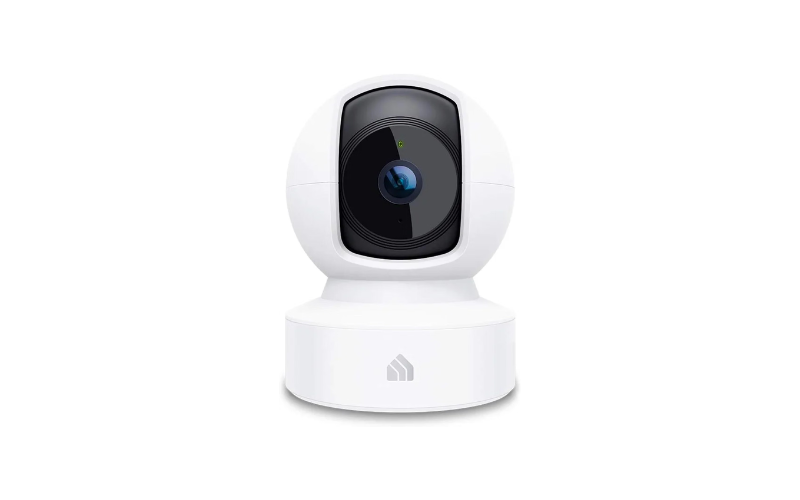
Kasa Smart EC70 | 1080p Pan/Tilt, No Subscription Required Local MicroSD Storage (Up to 256GB), Two-Way Audio, Night Vision |
Check Price |
 |
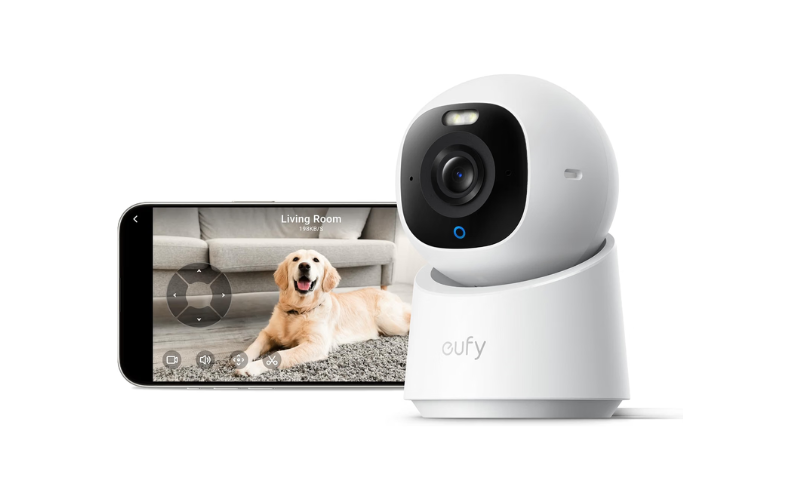
Eufy Security E30 | 4K Pan/Tilt, No Subscription Required AI Pet Tracking, Color Night Vision, Two-Way Audio |
Check Price |
1.Kasa Smart EC70: Best for Subscription-Free Local Storage
Anyone who has dealt with a pet camera that stops recording the moment a cloud plan lapses will appreciate what the Kasa Smart EC70 does differently. This pan-tilt indoor camera skips the subscription requirement entirely for its core recording function, relying instead on a MicroSD card slot that holds up to 256GB of continuous footage. For pet owners who just want to check on a dog or cat during the workday without signing up for another monthly bill, that alone makes it worth a look.
The camera pairs with the Tapo or Kasa app over 2.4GHz Wi-Fi and streams in 1080p, which is sharp enough to catch small details like a cat knocking something off a shelf or a dog scratching at the door. Its pan-and-tilt motor lets it follow motion around a room instead of sitting fixed on one corner, so pets that wander don’t disappear off-screen. A 120-degree field of view adds further coverage without needing a second unit in most standard-sized rooms.
Night vision extends to roughly 30 feet, useful for owners who work late shifts or want to check in after dark. Two-way audio lets you speak to a nervous pet mid-thunderstorm or call a dog away from chewing on furniture. The camera also ties into other Kasa smart home devices, so a motion alert can trigger a light to switch on automatically — a small touch that adds convenience beyond pure monitoring. Wi-Fi drops are a common frustration with any connected camera, so if yours ever loses connection, our guide on reconnecting a security camera to WiFi covers the general fix steps.
What Stands Out
- Records locally with no monthly fee required for core functionality
- Pan/tilt motion tracking keeps active pets in frame
- Two-way audio for real-time interaction
- Integrates with existing Kasa smart home routines
- Works with both Alexa and Google Assistant
Where It Falls Short
- 2.4GHz-only Wi-Fi can be a hurdle on networks that separate bands
- Optional cloud plan exists for those who want extended history, which may confuse buyers looking for a purely subscription-free product
- Indoor use only, so it won’t help with pets that spend time in a yard or garage
Why We Recommend It
For pet owners prioritizing local storage over cloud dependency, the EC70 solves a real pain point: losing access to footage the moment a subscription ends. The pan-tilt tracking and smart home integration push it beyond a basic static camera, making it a practical pick for anyone monitoring an active pet in a single room.
2.Eufy Security E30: Best for 4K Detail and AI-Powered Tracking
If picture clarity matters more than anything else, the eufy Security E30 pushes past the usual 1080p standard most pet cameras settle for. Its 4K sensor picks up fine detail, like whisker twitches or subtle limping, that lower-resolution cameras simply blur past. For owners tracking a pet’s recovery after surgery or just wanting a genuinely sharp view of their living room, that resolution jump makes a real difference.
The E30 skips subscription fees for its core recording too, storing footage locally on a MicroSD card while still unlocking every core feature without a monthly plan. What separates it from a basic no-subscription camera is the onboard AI: it distinguishes between a person, a pet, and ambient sound, then automatically pans and tilts to keep whatever it identifies as a pet within frame. That’s a meaningful upgrade over cameras that only detect generic motion and end up recording an empty doorway half the time.
Color night vision is another point worth flagging. Instead of switching to grainy black-and-white infrared after dark, the E30’s built-in spotlight keeps color visible at night, so you can actually tell your tabby apart from a shadow instead of squinting at a monochrome blob. The spotlight doubles as a mild deterrent too, which is handy if the camera also covers an entryway.
Smart home owners get solid coverage here as well, with support for HomeKit, Alexa, and Google Assistant, though HomeKit users should note that the platform caps the feed at 1080p regardless of the camera’s native 4K capture.
What Stands Out
- Genuine 4K clarity, well above typical pet camera resolution
- AI-based subject recognition separates pets from general motion, cutting down false alerts
- Color night vision instead of standard infrared
- Full functionality included without a required subscription
- Broad smart home compatibility
Where It Falls Short
- Requires a wired power connection rather than battery operation
- HomeKit integration limits video quality to 1080p, undercutting the camera’s main advantage
- Local storage still depends on a separately purchased SD card
Why We Recommend It
The E30 earns its place for pet owners who’ve been frustrated by cameras that either blur fine movement or flood their phone with false motion alerts. Combining native 4K video with on-device AI tracking solves both problems at once, and doing it without a mandatory subscription keeps ongoing costs out of the equation.
Kasa Smart EC70 vs Eufy Security E30: Quick Comparison
| Feature | Kasa Smart EC70 | Eufy Security E30 |
| Video Resolution | 1080p Full HD | 4K Ultra HD |
| Motion Tracking | Pan/tilt, motion-based | Pan/tilt, AI-powered subject tracking |
| Subject Detection | Generic motion/sound | AI distinguishes humans, pets, and sounds |
| Night Vision | Infrared, up to 30 ft | Color night vision with built-in spotlight |
| Field of View | 120 degrees | 360-degree panoramic |
| Power Source | Plugged in (wall outlet) | Wired, corded electric |
| Wi-Fi Band | 2.4GHz only | Wi-Fi (dual-band capable) |
| Local Storage | MicroSD, up to 256GB | MicroSD (sold separately) |
| Subscription Requirement | None for core features | None for core features |
| Smart Home Support | Alexa, Google Assistant, Kasa ecosystem | Alexa, Google Assistant, HomeKit (1080p cap) |
| Best For | Single-room monitoring, budget-conscious setups | Detail-focused monitoring, active pet tracking |
Buying Guide: What to Look for in a Pet Camera Without a Subscription
Choosing a subscription-free pet camera comes down to a handful of details that actually affect daily use, not just spec-sheet numbers. Here’s what genuinely matters before you buy one.
Local Storage Capacity and Format
Since you’re skipping cloud storage, the camera’s MicroSD support becomes the backbone of the whole system. Check the maximum card size it accepts and whether it overwrites old footage automatically once the card fills up. A camera that maxes out at a small card size will force you to review footage constantly instead of letting it run in the background. For a broader look at how footage retention actually works across different storage types, it helps to understand typical retention windows before deciding on card size.
Motion Detection vs. AI Subject Recognition
Basic motion sensors trigger on anything that moves, including curtains shifting in a breeze or sunlight crossing the floor. Cameras with AI-based detection tell the difference between a person, a pet, and background noise, which cuts down on pointless alerts and actually shows you footage worth watching. If your pet shares space with kids or other moving objects, this distinction matters more than most buyers expect.
Video Resolution for Actual Detail
1080p covers general monitoring fine, but 4K becomes useful when you need to catch small physical cues, a limp, a change in eating habits, or a pet chewing something it shouldn’t. Higher resolution also holds up better when you digitally zoom into a recording after the fact.
Field of View and Camera Movement
A fixed lens only sees the immediate wall in front of the camera. If your pet moves around a room, look for pan-and-tilt functionality or a wide-angle lens (120 degrees or more) so the camera actually keeps up with movement instead of missing it off-screen.
Night Vision Type
Standard infrared night vision washes footage into grainy black-and-white. Color night vision, usually paired with a small spotlight, keeps detail and color visible after dark, which makes it easier to spot injuries or unusual behavior overnight.
Power Source
Most subscription-free indoor cameras run on a constant wired connection rather than batteries, since continuous local recording draws steady power. Confirm the placement you have in mind is near an outlet before buying.
Smart Home Integration
If you already use Alexa, Google Assistant, or HomeKit, check compatibility before purchasing; some platforms cap the resolution a camera can stream even if the camera itself supports higher quality.
Two-Way Audio
Being able to speak to your pet in real time helps during anxious moments, like thunderstorms or separation anxiety, and can redirect bad behavior without you being physically present.
Frequently Asked Questions
Can you use a Furbo Mini without a subscription?
Yes, live viewing and basic motion alerts work without a paid plan. However, features like extended video history and certain smart alerts require a Furbo subscription to unlock fully.
What are the best cameras without a subscription?
Cameras that record to a local MicroSD card, like the Kasa Smart EC70 and Eufy Security E30, deliver full core functionality including live view, motion alerts, and two-way audio with no monthly plan required.
Is there a pet camera that dispenses treats without a subscription?
Some treat-tossing cameras, including certain Furbo models, allow manual treat dispensing without a subscription, though automated or scheduled tossing may sit behind a paid tier depending on the model.
Are there any pet cameras that don’t require Wi-Fi?
Most modern pet cameras rely on Wi-Fi for live streaming and app access. A small number of battery or cellular-based models exist for remote locations, but they’re uncommon and usually cost more.
What is the best pet camera for home?
The right pick depends on your priority. For sharper video and AI-based tracking, the Eufy E30 stands out. For simple, budget-friendly monitoring in one room, the Kasa Smart EC70 covers the basics well.
Can you use Furbo without Wi-Fi?
No, Furbo cameras need an active Wi-Fi connection to stream live video and send alerts to your phone. Without Wi-Fi, the camera won’t function for remote monitoring.
Which Furbo does not require a subscription?
Most Furbo models offer live streaming and motion detection without a subscription, but advanced features like person detection, extended cloud recording, and select smart alerts typically require a paid plan.
Can you tell if someone is watching on Furbo?
Furbo doesn’t show a visible indicator when someone is actively viewing the live feed. Account access logs may be available depending on the app version, but there’s no real-time on-screen notification.
Final Verdict
Both cameras skip subscription fees entirely, so the real choice comes down to what actually matters for your setup. Choose the Kasa Smart EC70 if you want dependable, no-fuss monitoring for a single room without extra complexity. Choose the Eufy Security E30 if sharper 4K clarity and smarter AI-based tracking matter more than keeping things simple. Either pick delivers full functionality from day one, with no recurring fees and no features held back behind a paywall. And if your camera ever drops off your network, our guide on fixing a security camera that won’t reconnect to WiFi walks through the standard troubleshooting steps.
About the Author
This review is written by the CrimTechHub team, led by a Criminology graduate with a background in studying security systems and risk assessment. That foundation shapes how we evaluate home monitoring devices, looking past marketing claims to focus on real security value, data privacy, and whether a product actually performs the way it’s advertised. Every camera featured on CrimTechHub is assessed with everyday homeowners and pet owners in mind, not just spec sheets.