Choosing the best long range wifi security camera depends on more than image quality. You also need to consider wireless signal strength, viewing distance, field of view, night vision, motion tracking, and how well the camera covers your property.
For homeowners in the USA, a long-range Wi-Fi camera can help monitor a driveway, backyard, garage entrance, or other outdoor area without running an Ethernet cable to the camera. However, a Wi-Fi camera still needs a reliable network connection, and some models require a nearby power outlet.
This guide compares two REOLINK outdoor security cameras: the TrackMix WiFi 4K, which offers automatic tracking and 6× hybrid zoom, and the Elite Pro WiFi 16MP, designed for wide-angle panoramic coverage. Both feature smart motion detection and local video storage, but their different capabilities make them suitable for different outdoor surveillance needs.
The goal is to help you decide which camera better suits your property, recording preferences, and coverage requirements—not simply which model has the higher resolution.
Table of Contents
What to Look for in a Long-Range WiFi Security Camera
Before choosing an outdoor security camera, compare its Wi-Fi range, video quality, viewing angle, night vision, smart detection, storage options, and power requirements to find the right fit for your property.
- Wi-Fi connectivity: A dual-band security camera can connect to a compatible 2.4 GHz or 5 GHz network. The actual wireless range depends on router performance, walls, signal interference, and camera placement.
- Viewing distance and image clarity: Motion detection at a distance does not always mean the camera can capture identifiable details. Resolution, optical zoom, lens quality, and lighting all affect how clearly you can see people or objects.
- Field of view: Panoramic cameras provide wide-area coverage, while pan-tilt-zoom (PTZ) cameras can change direction and zoom in on activity. Choose a design that suits your driveway, backyard, or other monitoring area.
- Night vision: Infrared night vision captures footage in black and white, while color night vision uses available light or built-in spotlights. Consider which option provides the detail you need after dark.
- Smart motion detection: Person, vehicle, and animal detection can help reduce unnecessary motion alerts. Custom detection zones may also let you focus on important areas, such as a driveway entrance or backyard gate.
- Video storage and recording: Check support for microSD cards, a network video recorder (NVR), network-attached storage (NAS), or continuous recording. Local storage can also help you retain footage without relying entirely on cloud services.
- Power requirements: A wired Wi-Fi camera uses a wireless network to transmit video but still needs a continuous power supply. Check the adapter, cable length, and nearby outlet before installation.
Remember that Wi-Fi signal range and camera viewing distance are not the same. A camera may capture distant objects clearly but still struggle to stream footage if the wireless signal is weak. Likewise, a strong Wi-Fi connection cannot compensate for limited zoom or poor image detail.
For more help with outdoor monitoring, read our related guide on the average cost of a home security system with cameras. It can help you compare your security needs and plan a suitable camera setup.
1. REOLINK TrackMix WiFi 4K Outdoor Security Camera
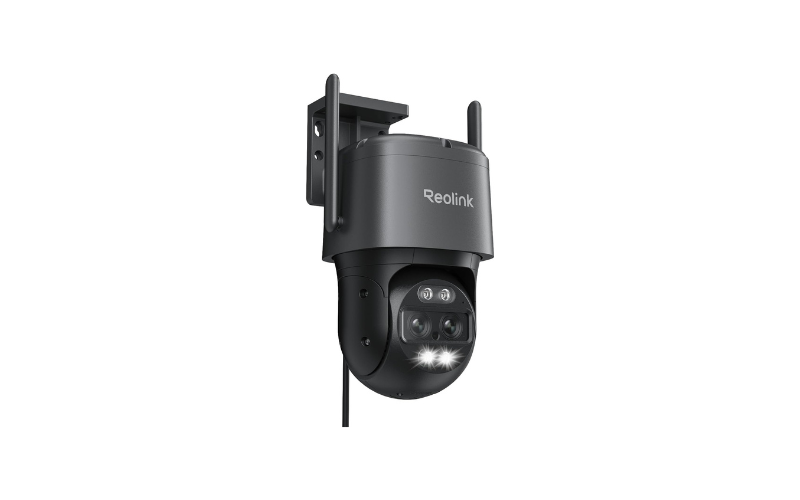
Best for active tracking and targeted close-up views
The REOLINK TrackMix WiFi is a dual-lens outdoor security camera designed for homeowners who want a wide overview and the ability to follow moving activity. Its 8MP resolution, PTZ movement, and hybrid zoom make it a useful option for monitoring areas such as driveways, front yards, and side entrances.
Unlike a fixed camera that continuously records the same view, the TrackMix can pan and tilt to follow a moving subject. Its dual-lens design also provides a wide-angle view alongside a closer view of the target.
Key Specifications
| Feature | REOLINK TrackMix WiFi |
| Resolution | 8MP, 4K UHD |
| Camera design | Dual-lens PTZ |
| Connectivity | 2.4/5 GHz Wi-Fi 6 |
| Zoom | 6× hybrid zoom |
| Pan and tilt | 355° pan, 90° tilt |
| Horizontal viewing angle | 104°–38° |
| Smart detection | Person, vehicle, cat and dog |
| Night vision | Color night vision with spotlights |
| Audio | Two-way audio |
| Storage | microSD up to 512GB, FTP and compatible REOLINK NVR |
| Power | Wired, continuous power required |
| Listed price | $169.99 at the time of the supplied product details |
What Makes the TrackMix WiFi Useful?
Dual-Lens Viewing With 6× Hybrid Zoom
The REOLINK TrackMix WiFi combines two lenses to provide a wide outdoor view and a closer look at detected activity. This design helps monitor driveways, backyards, and other areas where both broad coverage and detailed viewing are important.
Its 6× hybrid zoom combines optical and digital zoom technology. Image clarity may decrease at higher zoom levels, so it should not be confused with 6× optical zoom.
Automatic Tracking for Moving Subjects
The camera’s pan-tilt-zoom (PTZ) mechanism can follow detected movement by adjusting its viewing direction. This feature is useful for monitoring people or vehicles moving through a driveway, yard, or other outdoor space.
REOLINK advertises a tracking distance of up to 50 feet in both daytime and nighttime conditions. Actual performance can vary with lighting, subject movement, and environmental conditions. Tracking at this distance does not guarantee clear facial details or readable license plates.
Person, Vehicle, and Pet Detection
The TrackMix WiFi supports person, vehicle, and animal detection, allowing it to send alerts when supported activity is identified. Pet detection can also help homeowners monitor cats and dogs around their property.
Detection accuracy depends on camera placement, sensitivity settings, and surrounding conditions. Review the notification settings after installation to help reduce unwanted alerts.
Color Night Vision
Built-in spotlights allow the camera to capture color footage in low-light conditions. This can reveal useful details that black-and-white infrared footage may not show, although results depend on available light and the subject’s distance from the camera.
Flexible Recording and Local Storage
The TrackMix WiFi supports microSD cards up to 512GB, FTP storage, and compatible REOLINK NVR systems. The microSD card is sold separately, so include its cost when planning your security camera setup.
Local recording lets you store video without relying entirely on cloud storage. Before buying, check which recording modes and storage options match your needs.
For another practical security upgrade, read our guide on how to open an alarm sensor to change the battery. It explains how to handle common battery replacement tasks for compatible home alarm sensors.
Pros and Cons
Pros
- 4K resolution with a dual-lens design.
- Automatic PTZ tracking and 6× hybrid zoom.
- Person, vehicle, and pet detection.
- Color night vision with built-in spotlights.
- Multiple local storage options.
- Dual-band Wi-Fi 6 connectivity.
Cons
- Requires continuous power from an adapter.
- Does not provide battery-powered, wire-free installation.
- The microSD card is not included.
- Hybrid zoom does not guarantee identification-quality detail at long distances.
- PTZ tracking requires appropriate positioning and a reliable connection.
Who Should Choose the TrackMix WiFi?
This camera is a strong candidate if you want to follow moving subjects and inspect specific areas more closely. It may suit a long driveway, a side yard, or a property where activity moves through different parts of the scene.
However, if your main priority is covering an extremely wide area without moving the camera, a panoramic model may be a better fit.
2. REOLINK Elite Pro WiFi 16MP Outdoor Security Camera
Best for wide-area coverage and continuous recording
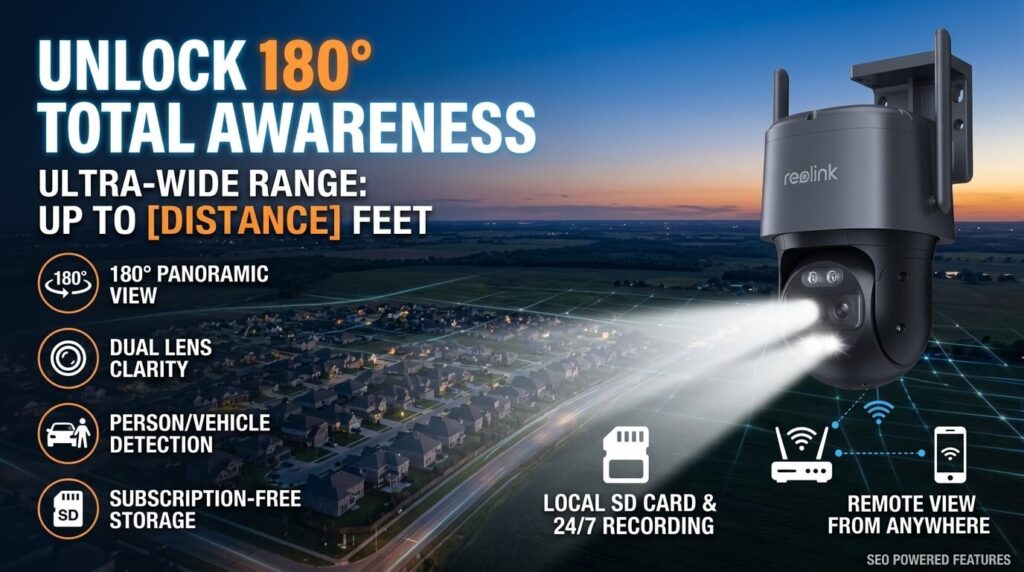
The REOLINK Elite Pro WiFi takes a different approach to outdoor surveillance. Instead of relying primarily on a moving PTZ camera, it uses two 4K sensors to provide a combined 16MP image and a 180-degree panoramic view.
This design can be useful for monitoring a broad driveway, backyard, parking area, or other open space where a wide field of view matters more than following one moving subject.
The Elite Pro also includes smart detection, built-in deterrence features, local AI video search, and several storage options.
Key Specifications
| Feature | REOLINK Elite Pro WiFi |
| Resolution | 16MP |
| Camera design | Dual-lens panoramic |
| Connectivity | Dual-band Wi-Fi 6 |
| Horizontal viewing angle | 180° |
| Vertical viewing angle | 55° |
| Smart detection | Person, vehicle and animal |
| Night vision | Infrared and color options |
| Active deterrence | Floodlights and customizable siren |
| Recording | Advertised 24/7 recording |
| Storage | microSD up to 512GB, NVR, Home Hub, FTP/NAS |
| AI video search | Local, on-device AI |
| Monthly subscription | No subscription required for the advertised local-storage features |
| Listed price | $178.49 at the time of the supplied product details |
What Makes the Elite Pro WiFi Useful?
16MP Resolution and a 180-Degree Panoramic View
The REOLINK Elite Pro WiFi uses two 4K image sensors to deliver a combined 16MP image and a 180-degree horizontal field of view. This panoramic design helps monitor a broad outdoor area from one mounting position, potentially reducing the need for multiple cameras in open spaces.
It can be a practical option for watching wide driveways, backyards, and other large areas. However, image detail is spread across the scene, so resolution alone does not guarantee clear identification of distant people or objects.
Wi-Fi 6 for Wireless Video Streaming
The Elite Pro supports dual-band Wi-Fi 6, allowing it to connect to compatible 2.4 GHz or 5 GHz networks. A suitable router and reliable signal can support live video streaming, remote monitoring, and security notifications.
However, Wi-Fi 6 does not automatically provide a longer connection range. Walls, trees, metal structures, and wireless interference can weaken the signal. Test Wi-Fi coverage at the intended installation point before mounting the camera.
Smart Detection and Customizable Alerts
The camera supports person, vehicle, and animal detection, along with configurable alerts for events such as line crossing, zone intrusion, and loitering.
These smart detection features let you focus on activity that matters most. For example, you can create a detection zone around a driveway entrance or set a line-crossing alert near a gate. Adjusting these settings can help reduce unnecessary motion notifications.
Built-In Floodlights and Adjustable Siren
The Elite Pro includes integrated floodlights and a customizable siren that can provide an additional response to supported motion events. These features may help draw attention to unexpected activity in dark outdoor areas.
Active deterrence is not a substitute for locks, secure entry points, or other physical security measures. Adjust the lighting and siren settings with nearby residents, local noise rules, and surrounding conditions in mind.
Local AI Video Search
The Elite Pro offers AI-powered video search that lets you locate recorded events using simple text descriptions. Instead of manually reviewing hours of surveillance footage, you can search for relevant activity and narrow down the recordings you need to check.
The advertised local search feature can reduce reliance on cloud-based processing. Available functions may vary depending on the camera’s software and configuration, so confirm the supported features before purchasing.
24/7 Recording and Subscription-Free Local Storage
The Elite Pro supports continuous video recording and several storage options, including microSD cards up to 512GB, compatible REOLINK NVR systems, Home Hubs, and FTP or NAS storage. A microSD card may need to be purchased separately.
For homeowners who want ongoing access to security footage without monthly cloud-storage fees, local recording can be a useful advantage. Keep in mind that recording duration depends on storage capacity, video quality, recording settings, and the amount of activity captured.
Before deciding on a camera system, see our guide to the average cost of a home security system with cameras. It can help you consider equipment costs, storage requirements, and the features that fit your home security budget.
Pros and Cons
Pros
- 16MP resolution using dual 4K sensors.
- Wide 180-degree horizontal field of view.
- Person, vehicle, and animal detection.
- Floodlights and customizable siren.
- Advertised 24/7 recording.
- Local AI video search.
- Multiple storage options without a required subscription for advertised local features.
Cons
- A fixed panoramic view does not offer the same target-following movement as a PTZ camera.
- High resolution does not guarantee clear identification at every distance.
- Actual performance may vary depending on signal strength, camera placement, and the conditions around your property.
- Continuous recording requires suitable storage and configuration.
- Its wide view may limit close-up tracking of moving subjects.
Who Should Choose the Elite Pro WiFi?
Choose this model if your main goal is to monitor a wide outdoor area from one position. It is worth considering for large driveways, open yards, and parking areas where reducing blind spots is important.
It is also a compelling option if you want continuous recording, local video search, and subscription-free local storage features.
If tracking a moving person or vehicle and switching between wide and close-up views is your priority, the TrackMix may suit you better.
REOLINK TrackMix vs. Elite Pro: Which Is Better?
Both cameras offer high-resolution outdoor surveillance, dual-band Wi-Fi 6, smart detection, and local recording options. The main difference is how they cover an area.
| Feature | TrackMix WiFi 4K | Elite Pro WiFi 16MP |
| Main strength | Moving-target tracking | Wide panoramic coverage |
| Resolution | 8MP | 16MP |
| Horizontal view | 104°–38°, depending on lens | 180° |
| Camera movement | 355° pan, 90° tilt | Panoramic fixed view |
| Zoom | 6× hybrid zoom | Not specified in the supplied details |
| Pet detection | Yes | Animal detection |
| Active deterrence | Spotlights; no siren specified in the supplied details | Floodlights and customizable siren |
| Continuous recording | Recording modes depend on configuration | Advertised 24/7 recording |
| Local AI video search | Not specified in the supplied details | Yes |
| Listed price | $169.99 | $178.49 |
Prices are from the product information supplied for this article and may change. The two models also have different review counts, so their displayed ratings should not be treated as a direct, like-for-like performance test.
Which Camera Is Better for Different Needs?
Choose the TrackMix WiFi if…
- You want automatic tracking of moving subjects.
- You need detailed close-up views of activity in monitored areas.
- You need both wide-area coverage and detailed zoomed-in views.
- Your property has a driveway or yard where movement occurs across different positions.
Choose the Elite Pro WiFi if… - You need a broad 180-degree view.
- You want to monitor a wide driveway, parking area, or backyard.
- You prefer advertised 24/7 recording and local AI video search.
- You need integrated floodlights and an adjustable security siren for added outdoor protection.
Neither model is automatically the best choice for every long-range installation. The right option depends on whether your priority is viewing a large area or following and examining a specific subject.
How to Get the Best Long-Range Performance From a Wi-Fi Security Camera
Even a feature-rich camera can perform poorly if the wireless connection is weak. Before buying either model, consider the following installation tips.
1. Check Wi-Fi Signal Strength at the Mounting Location
Test the wireless signal where you plan to install the camera, not just next to your router. A connection that works well indoors may become unreliable outside, especially when the signal passes through several walls.
If coverage is weak, consider repositioning your router or using a compatible access point or outdoor access point. A Wi-Fi extender may help, but the result depends on its placement and the quality of its connection to the main network.
2. Choose the Right Wi-Fi Band
Both cameras support dual-band Wi-Fi 6 connectivity.
- 2.4 GHz: Often provides better reach through obstacles, although interference and congestion can reduce performance.
- 5 GHz: Can offer higher throughput but generally has less range through walls and other obstructions.
Choose a band based on the actual conditions at your property. Router compatibility, camera configuration, and signal quality matter more than the band name alone.
3. Mount the Camera With a Clear View
Mount the security camera away from thick plants, reflective surfaces, and obstructions that could interfere with its field of view.
For a panoramic camera, choose a position that captures the full area you want to monitor. For a PTZ camera, make sure its movement is not obstructed by roof edges, walls, or other objects.
4. Separate Detection Distance From Identification Distance
A camera may detect movement at a distance but still produce footage that lacks enough detail to identify a face or read a vehicle’s license plate.
Consider the subject’s size in the image, available lighting, camera angle, lens capabilities, and movement speed. If identification at a specific distance is essential, test the camera at that distance before relying on it for security.
5. Plan Power and Recording Before Installation
Both products described here require a suitable power arrangement; the TrackMix specifically needs continuous power from an adapter. Neither should be assumed to be a battery-powered, wire-free camera.
Also decide whether you need motion-triggered clips or continuous recording. Continuous recording uses more storage, so a suitable microSD card, NVR, or network-storage setup may be necessary.
6. Test Alerts and Night Vision
After installation, test person and vehicle detection, notification delivery, and the night-vision mode you intend to use. Adjust detection zones and sensitivity to reduce unwanted alerts.
Check the image after dark from the actual mounting position. A camera’s daytime performance may not reflect its nighttime results, especially when the subject is far away.
Important Buying Considerations Before You Choose
When comparing long-range Wi-Fi security cameras, look beyond advertised features and consider their practical limitations. These factors can help you choose a camera that suits your property’s layout, recording needs, and security requirements.
Wi-Fi range and signal strength: Neither product description provided here specifies a guaranteed maximum Wi-Fi connection distance. Actual wireless coverage depends on your router, building materials, interference, and camera placement. Test the signal at the planned installation point before relying on a camera for remote monitoring.
Video clarity at long distances: The TrackMix offers 6× hybrid zoom, while the Elite Pro provides 16MP panoramic imagery. These features serve different purposes, so the specifications alone do not establish which camera will capture clearer identifying details at a particular distance. Lens design, lighting, subject distance, and image processing also affect video quality.
Local storage and recording capacity: Both cameras support microSD cards up to 512GB. The card is sold separately for the TrackMix based on the supplied product information; check the Elite Pro’s package contents before purchasing. Actual recording time depends on resolution, frame rate, compression, motion activity, and whether continuous recording is enabled.
Cloud services and subscription fees: The Elite Pro advertises local recording and AI video search without a required subscription for these features. Before choosing either model, verify whether the remote access, cloud storage, or advanced functions you want involve additional charges.
Outdoor installation and power supply: Check the mounting location, weather exposure, available power outlet, cable routing, and Wi-Fi coverage before installation. Follow the manufacturer’s instructions to ensure the camera is positioned securely and can operate reliably.
Privacy and camera security: Aim outdoor surveillance cameras toward areas you need to monitor, such as your driveway or entrance, while minimizing unnecessary views of neighboring properties and private spaces. Use a strong, unique password, enable available security features, and keep the camera firmware and mobile app updated.
For further guidance, the Federal Trade Commission (FTC) explains how to protect connected security cameras, secure home Wi-Fi networks, and reduce the risk of unauthorized access. Read its informational guide: How to Secure Your Home Security Cameras.
Taking these factors into account can help you assess wireless coverage, image quality, storage capacity, installation requirements, and privacy before selecting an outdoor security camera.
FAQs
1. What is the best long range WiFi security camera?
The best option depends on your surveillance needs. The REOLINK TrackMix WiFi is worth considering for automatic tracking and hybrid zoom, while the REOLINK Elite Pro WiFi is designed for broad 180-degree panoramic coverage. Neither specification alone guarantees a particular wireless range or identification distance.
2. Does a Long-Range Wi-Fi Security Camera Require Internet?
Most Wi-Fi security cameras need an internet connection for remote viewing and smartphone alerts when you’re away from home. However, some models can save footage to local storage without internet access. Remote monitoring and other smart features may not work offline, so check the camera’s recording options and connectivity requirements before buying.
3. Is 2.4 GHz or 5 GHz better for an outdoor security camera?
A 2.4 GHz connection often reaches farther through obstacles, while 5 GHz can provide higher throughput under suitable conditions. The best option depends on your router, interference, distance, and building materials. Test the connection at the intended camera location before installation.
4. Is a 4K camera better than a 16MP camera?
Not necessarily. A 4K camera such as the TrackMix provides approximately 8MP resolution, while the Elite Pro combines two 4K sensors for a 16MP panoramic image. The wider image and total pixel count do not automatically mean better detail on a distant subject. Lens design, sensor performance, lighting, and viewing distance all matter.
5. Can these cameras record without a monthly subscription?
Both models support local recording options. The TrackMix supports microSD, FTP, and compatible NVR storage, while the Elite Pro also supports local storage through compatible Home Hubs and FTP/NAS. The Elite Pro specifically advertises local AI video search without a subscription. Confirm the requirements for any additional cloud or premium features you want to use.
6. Which camera is better for a long driveway?
The TrackMix may be more suitable when you want to track movement and obtain a closer view of a target. The Elite Pro may be preferable when the priority is covering a wide driveway with a 180-degree panoramic view. The driveway’s layout, lighting, and Wi-Fi coverage should guide the final decision.
7. Can these cameras identify a person from a long distance?
They may capture useful footage at a distance, but reliable identification is not guaranteed. Detection distance and identification distance are different. Test the actual image quality at the distance and lighting conditions that matter to your property.
8. Do these REOLINK cameras work without a power cable?
The TrackMix WiFi described here requires continuous power from an adapter. Do not assume it is battery-powered simply because it connects over Wi-Fi. Check the Elite Pro’s power requirements and installation instructions before choosing a mounting location.
Final Verdict: Which Long-Range Wi-Fi Camera Should You Buy?
The REOLINK TrackMix WiFi 4K is a suitable choice if you want automatic tracking, 6× hybrid zoom, and detailed views of moving activity. The REOLINK Elite Pro WiFi 16MP is worth considering for 180-degree panoramic coverage, continuous recording, local AI video search, and built-in floodlights.
Before choosing, compare Wi-Fi signal strength, viewing distance, power requirements, and storage options to find the best fit for your property.
For more guidance, read our guide to the average cost of a home security system with cameras to help plan your security setup.
About the Author
M. Bilal — Criminologist and Home Security Expert
M. Bilal holds a BS in Criminology and has one year of content-writing experience. He writes about home security technology, surveillance cameras, and practical security solutions to help readers make informed decisions.
Affiliate Disclosure
CrimTechHub may earn a commission from qualifying purchases made through affiliate links, at no additional cost to the buyer. This helps support our content and website operations.