Introduction
A fire breaks out on the 7th floor. Firefighters arrive in minutes — but stand frozen in the lobby, unsure which way to go. That confusion is exactly what an annunciator panel fire alarm system is built to eliminate, pointing responders straight to the source the moment they walk in.
Table of Contents
When Seconds Matter, Location Is Everything
A fire alarm sounds. The building empties out. Firefighters show up in minutes — and then stall in the lobby of a 12-story building, unsure where the fire actually is. Third floor? Basement? The electrical room on nine?
Every second lost to that guessing game is a second the fire gains.
This is the blind spot most people never think about: detecting a fire isn’t the hard part — knowing exactly where it is, is. Without that answer, responders are working blind, and in a real fire, blind means slow.
An annunciator panel closes that gap. It pulls every signal from the building’s fire alarm network and displays it in one place, right where responders look first — the entrance. In practice, that means:
- No blind searching through smoke-filled floors
- Immediate zone identification on arrival
- Faster action, fewer casualties
- A direct line of communication between the life safety system and the crew walking in
This is why hospitals, schools, high-rises, and hotels across the U.S. treat this small panel as a non-negotiable part of their home security alarm systems — the difference between a fast response and a costly delay.
Internal link “home security alarm systems” pe laga diya hai — yeh affiliate/roundup guide hai jo related posts mai already listed thi, aur topically bhi fit baithti hai (dono life-safety/alarm system category mai hain).
What Is an Annunciator Panel in a Fire Alarm System?
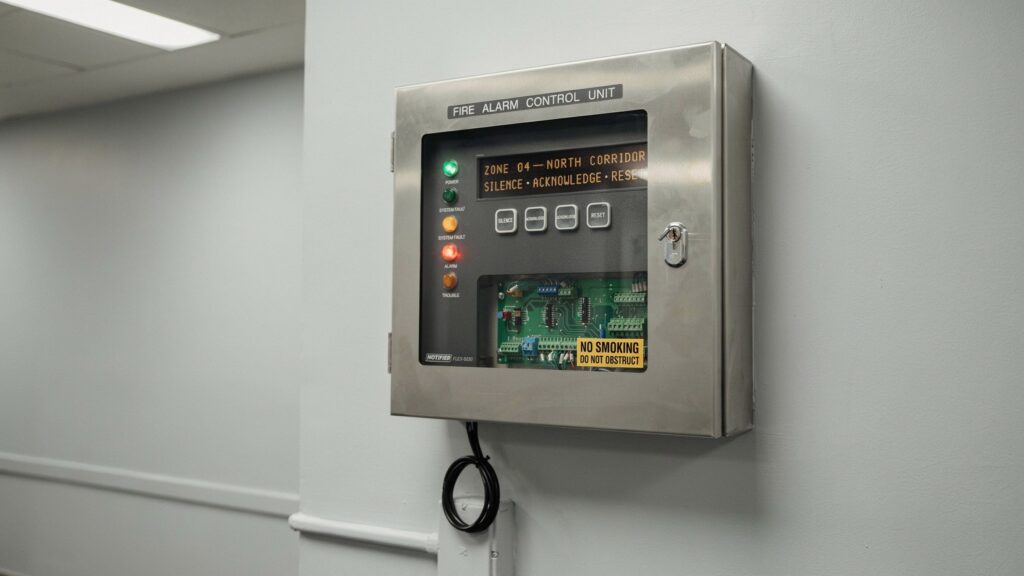
An annunciator panel is a display unit wired into your building’s fire alarm control panel (FACP). Its job is simple: show exactly where an alarm triggered, the instant it happens.
Picture it as the building’s emergency dashboard. The FACP does the thinking behind the scenes; the annunciator panel is what a human actually reads when every second counts.
It usually sits near the main entrance or lobby, right where firefighters and staff will see it first. What it shows:
- Zone locations — the floor, wing, or room where the alarm fired
- Alarm status — active alarm, supervisory signal, or system trouble
- Visual indicators — LED lights or an LCD screen reflecting live status
Most setups use one wall-mounted panel labeled by zone; larger campuses or hospitals often add multiple remote annunciators at key entry points.
It doesn’t function on its own — it’s a companion to the fire alarm system, not a replacement for it. Skip it, and even the most advanced home security systems are left without their most critical piece: a way to tell responders exactly where to go.
How Does a Fire Alarm Annunciator Panel Work?
The process is simple, and that simplicity is exactly why it holds up under pressure.
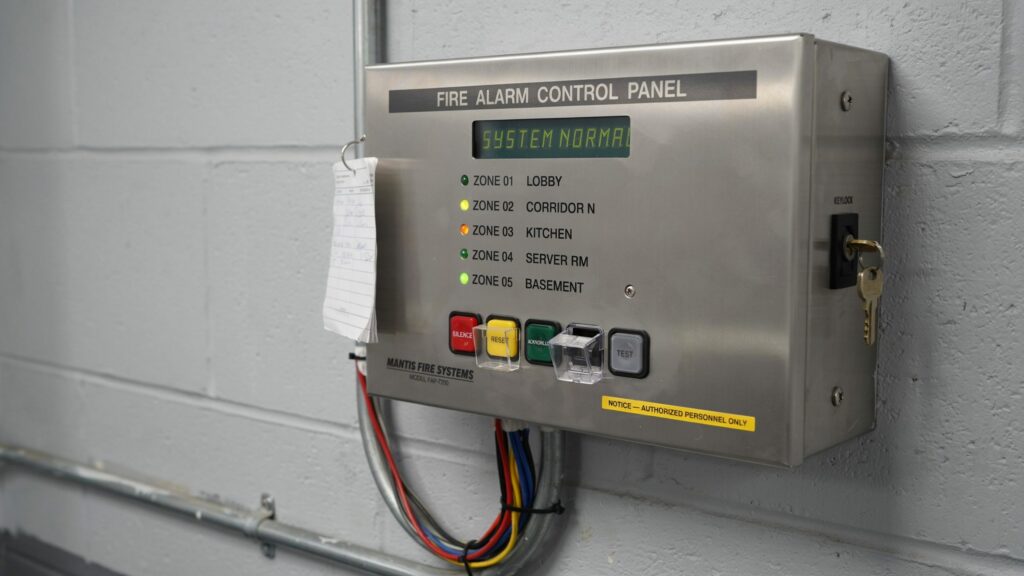
When a smoke detector, heat sensor, or pull station trips anywhere in the building, it sends a signal to the fire alarm control panel. The FACP reads that signal and pushes it straight to the annunciator display — the whole handoff takes seconds, no manual steps involved.
Understanding that sequence helps facility managers and contractors make better calls on placement, integration, and maintenance — the same logic that applies across most home security alarm systems.
Step-by-Step: From Trigger to Display
Every activation follows the same path:
- Detection — a smoke detector, heat sensor, pull station, or sprinkler flow switch picks up the threat and fires an electrical signal
- FACP Processing — the panel receives the signal, identifies the zone, and classifies the alarm type, following the framework laid out in NFPA 72
- Annunciator Update — the FACP pushes that data to the display, lighting the correct zone or updating the LCD
- Responder Action — firefighters read the panel at the entrance and head straight to the affected area
Trigger to display, the whole chain completes in seconds — and in a real fire, those seconds are the difference that matters.
What the Annunciator Panel Actually Shows
Once activated, the annunciator panel fire alarm system displays three critical pieces of information simultaneously:
- Zone location — the exact floor, wing, room, or area where the alarm originated
- Alarm classification — whether the event is a full fire alarm, a supervisory signal, or a system trouble alert
- Multiple zone alerts — if more than one area triggers at once, all active zones appear on the panel at the same time
There is no digging through system logs. No calling a monitoring center for location details. Every piece of information a first responder needs is right there — visible, labeled, and readable within seconds of walking through the door.
How the Panel Stays in Sync with the FACP
Most modern annunciator panels maintain constant, real-time communication with the fire alarm control panel through one of two connection types:
- Dedicated hardwired connections — direct wiring between the FACP and the annunciator panel, common in conventional fire alarm systems
- Addressable system connections — digital communication loops used in addressable systems, allowing the panel to display specific device-level information rather than just zone data
Both methods are supervised — meaning the system continuously monitors the connection itself. If a wiring fault or communication failure occurs, the panel triggers a trouble signal immediately. This built-in supervision ensures the annunciator panel fire alarm system is always ready when it needs to be, not just during scheduled tests.
Why Simplicity Is the Whole Point
It’s not a complicated device — and that’s intentional.
Annunciator panels are designed to be read by someone who has never set foot in the building before. A firefighter arriving at an unfamiliar facility at 2 a.m. should be able to walk up to the panel and understand exactly where to go within seconds. That means:
- Clear zone labeling — no codes or abbreviations that require interpretation
- Color-coded indicators — red for alarm, yellow for supervisory or trouble, green for normal system status
- Intuitive layout — zones organized by floor or wing to match the building’s physical structure
In a crisis, clarity saves lives. A well-placed, properly integrated annunciator panel fire alarm system doesn’t just display information — it eliminates the one thing that costs emergency responders the most time: uncertainty.
Types of Annunciator Panels and Where They’re Used
Not every building needs the same setup — the right annunciator panel depends on facility size, system complexity, and where responders need the information fastest.
LED vs. LCD Annunciator Panels
These are the two display types you’ll see most often in U.S. buildings.
LED panels use individual indicator lights, one per zone — when a light activates, responders know exactly where to go. Simple, durable, and easy to read at a glance.
LCD panels show text-based detail — zone names, alarm descriptions, system messages — making them a better fit for larger or more complex properties.
Remote vs. Local Annunciator Panels
- Local panels sit right next to the FACP — common in smaller buildings where one location works for both
- Remote annunciator panels are placed away from the main panel, often at the entrance or inside a dedicated fire command center — giving responders immediate access without searching the building for the main unit
Where They’re Commonly Installed
The annunciator panel fire alarm system is a standard requirement across a wide range of U.S. facilities:
- Hospitals and healthcare facilities — where every second and every floor matters
- Schools and universities — large campuses with multiple zones and access points
- High-rise office buildings — where vertical response requires precise floor identification
- Hotels and apartment complexes — high occupancy buildings with strict life safety codes
If a building has multiple floors, multiple wings, or high foot traffic — it needs an annunciator panel. It’s that straightforward.
Key Features to Look for in an Annunciator Panel
If fire safety falls under your responsibility — facility manager, contractor, or property owner — the annunciator panel you choose isn’t a minor spec. It’s a decision that shapes how fast help finds the fire.
Zone Display Clarity
A firefighter who has never set foot in your building should read the panel and understand it within seconds. LED or LCD, it doesn’t matter — what matters is that zones are labeled clearly enough that there’s no hesitation, no confusion, no second-guessing under pressure.
Full FACP Integration
The panel is only as useful as its connection to the fire alarm control panel. A poor sync means missed signals, display errors, or — worst case — a blank screen exactly when it’s needed most.
ADA Compliance
Mounting height, visual indicators, and accessible controls aren’t optional extras — they’re a legal requirement in most U.S. facilities, and skipping them creates liability along with a safety gap.
Built to Hold Up Under Pressure
- Supervised wiring — flags a fault between the panel and FACP before it becomes a blind spot
- Backup power support — keeps the display active through a power outage
- Trouble signal alerts — surfaces problems before an emergency puts them to the test
NFPA 72 Compliance
Every annunciator panel installed in the U.S. has to meet NFPA 72 — the national fire alarm and signaling code. Confirm this before you buy or install, not after.
A building’s life safety systems are only as strong as the weakest link in the chain — and the annunciator panel deserves the same scrutiny as every other piece of that setup.
Conclusion
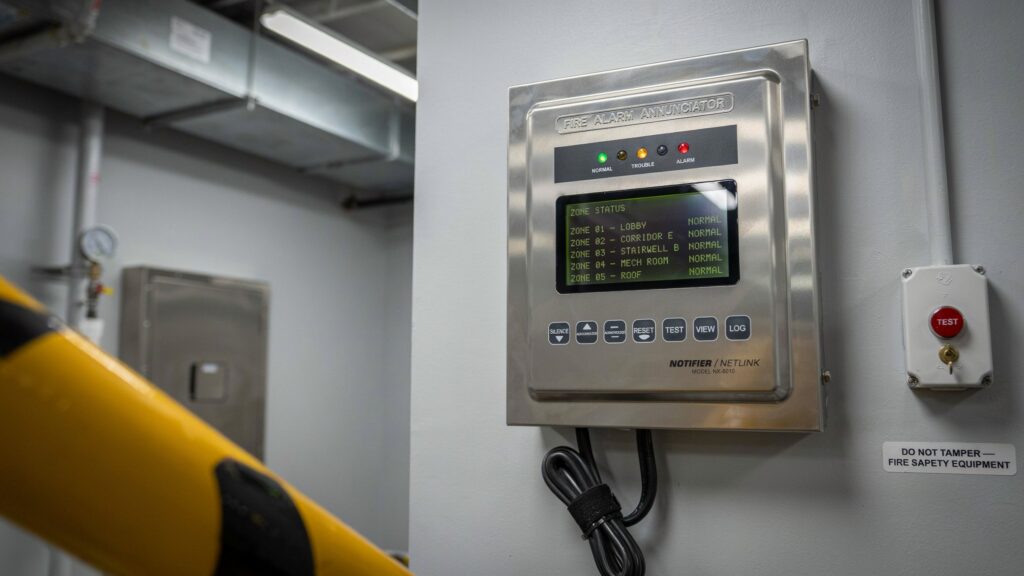
A fire alarm tells you something is wrong. An annunciator panel tells you where — and that difference decides how fast help actually reaches the fire.
Most delayed responses don’t happen because the alarm failed. They happen because responders wasted precious seconds figuring out which floor, which wing, which room. A properly installed annunciator panel removes that guesswork entirely.
Hospital, school, or high-rise — the need is the same: instant location, zero delay. The panel may be small, but the seconds it saves are not.
FAQs
Q: What is an annunciator panel in a fire alarm system?
A: It’s a display unit wired to the fire alarm control panel that shows exactly which zone triggered an alarm, giving responders instant location information the moment they arrive.
Q: What is the purpose of a fire alarm annunciator panel?
A: It removes the guesswork. Instead of searching floor by floor, firefighters and building staff see immediately where the emergency is coming from.
Q: What’s the difference between an annunciator panel and a fire alarm control panel?
A: The FACP is the brain — it processes every signal from the building’s sensors. The annunciator panel is the face — it displays that information somewhere responders can actually see it.
Q: Are annunciator panels required by law in the U.S.?
A: In most commercial buildings, yes. NFPA 72 and local fire codes require one whenever the FACP itself isn’t visible or accessible from the main entrance.
Q: Where should an annunciator panel be installed?
A: Typically near the main entrance or lobby — the first place firefighters and building staff will look when they arrive on scene.
Q: Can a building have more than one annunciator panel?
A: Yes. Larger facilities like hospitals, universities, and high-rises often install multiple remote annunciators at different access points for faster response across a bigger footprint.